Variables
Variables are Resources that hold a typed value and emit a signal when the value changes.
Most variable scripts live under addons/godot_meds_core/scripts/variables/.
At a glance
- Every typed variable exposes a typed
value, a typedset_value(...)helper, and avalue_changed(...)signal. BaseVariableprovides the shared runtime behavior.NumericVariableadds shared numeric rules forFloatVariableandIntVariable.
Class hierarchy
| Icon | Type | Extends | Purpose |
|---|---|---|---|
 | BaseVariable | Resource | Shared base resource for all variable types |
| NumericVariable | BaseVariable | Shared numeric behavior for clamped float and int variables |
Typed variables
| Icon | Type | Value type | Notes |
|---|---|---|---|
 | BoolVariable | bool | Basic boolean state |
 | IntVariable | int | Optional clamping and range metadata |
 | FloatVariable | float | Optional clamping and range metadata |
 | StringVariable | String | Text values |
 | ColorVariable | Color | Colors and tints |
 | Vector2Variable | Vector2 | 2D positions and directions |
 | Vector3Variable | Vector3 | 3D positions and directions |
Common API
The following behavior comes from BaseVariable and applies to every typed variable resource.
| Member | Purpose |
|---|---|
value | The current typed runtime value |
value_changed(new_value) | Signal emitted when the value changes |
initial_value | Exported starting value used when the resource is initialized |
debug_logs | Logs value changes, listeners, and caller context |
save_to_device | Persists the value to user://settings.cfg and restores it on load |
reset_on | Controls whether the value resets on scene load or only when the application starts |
reset_on supports two modes:
On Scene Load: reset when a new scene is loaded.On Application Start: keep the runtime value cached across scene changes until the app restarts.
When save_to_device is enabled, values are stored in the variables section of user://settings.cfg using the resource path basename as the key.
Numeric behavior
NumericVariable is the shared base for FloatVariable and IntVariable.
| Member | Purpose |
|---|---|
clamp_value | Enables runtime clamping |
min_value | Lower bound for numeric values |
max_value | Upper bound for numeric values |
range_changed(clamp_enabled, min_value, max_value) | Signal emitted when numeric range settings change |
Both initial_value and runtime value assignments are sanitized through the numeric clamp rules.
Creating a variable resource
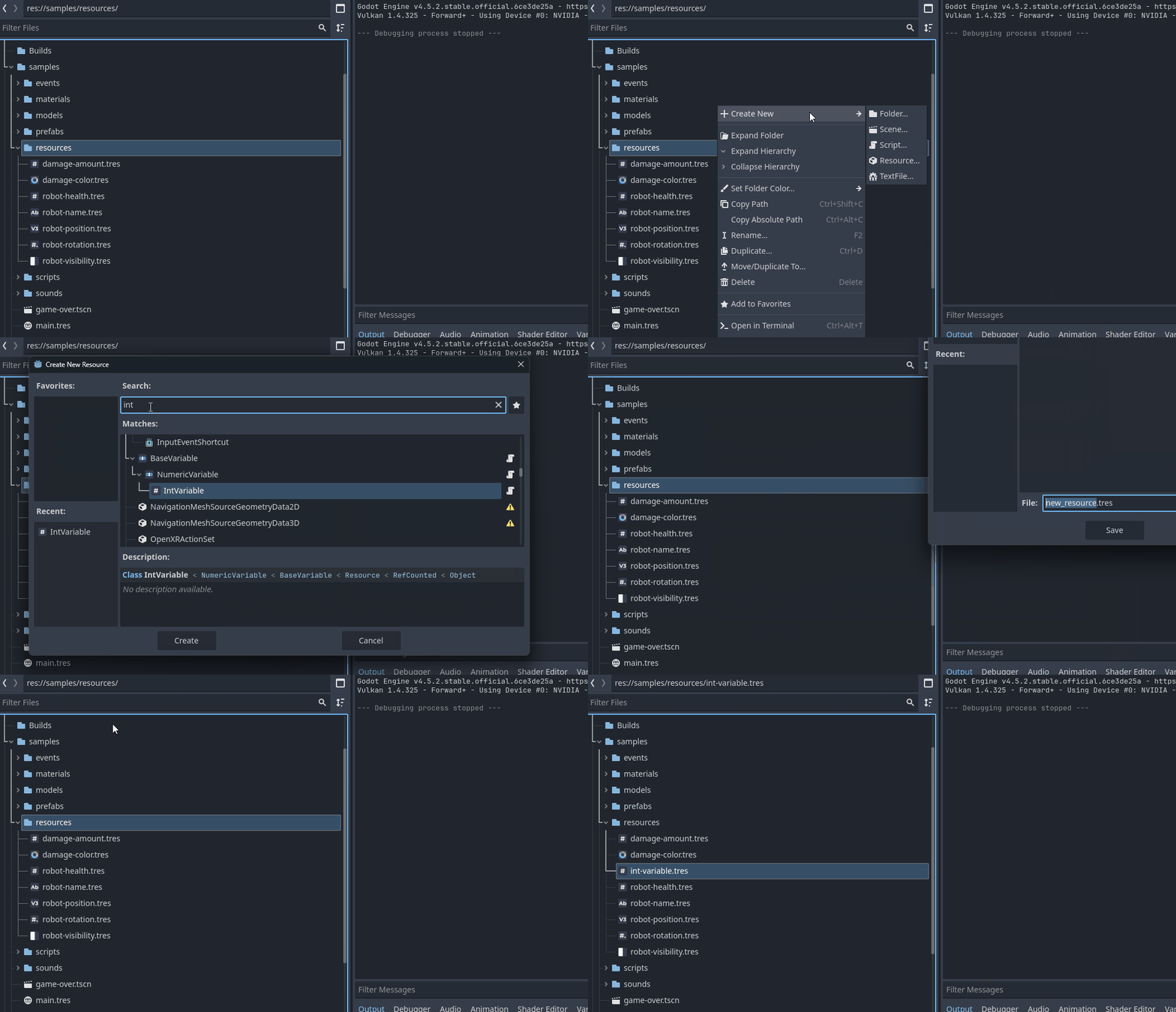
- In the FileSystem dock: Right click → New Resource…
- Pick a typed resource such as
BoolVariable,FloatVariable, orStringVariable. - Save it as a
.tres. - Assign that
.tresto exported fields in scripts.
Use FloatVariable or IntVariable when you want sliders, progress bars, or other UI to react to value ranges.
Script examples
Basic variable usage
This example connects to a BoolVariable and reads its current value.
extends Node

@export var bool_variable: BoolVariable

func _ready() -> void:
	bool_variable.value_changed.connect(_on_bool_changed)
	print("Initial value:", bool_variable.value)

func _on_bool_changed(new_value: bool) -> void:
	print("Bool changed to:", new_value)
When you want debug output to include the caller, prefer the typed helper method:
bool_variable.set_value(true, self)
Numeric variable usage
This example shows a FloatVariable with range notifications and a typed setter.
@export var health: FloatVariable

func _ready() -> void:
	health.range_changed.connect(_on_health_range_changed)
	health.value_changed.connect(_on_health_changed)
	health.set_value(125.0, self)

func _on_health_range_changed(clamp_enabled: bool, min_value: float, max_value: float) -> void:
	print("Clamp:", clamp_enabled, "Range:", min_value, "-", max_value)

func _on_health_changed(new_value: float) -> void:
	print("Health:", new_value)